
Your operation runs on a spreadsheet nobody is allowed to touch.
It has twelve tabs, three colour conventions, and one person who understands it. It works until they're on holiday. What you need is the same logic in something several people can use at once without breaking it.
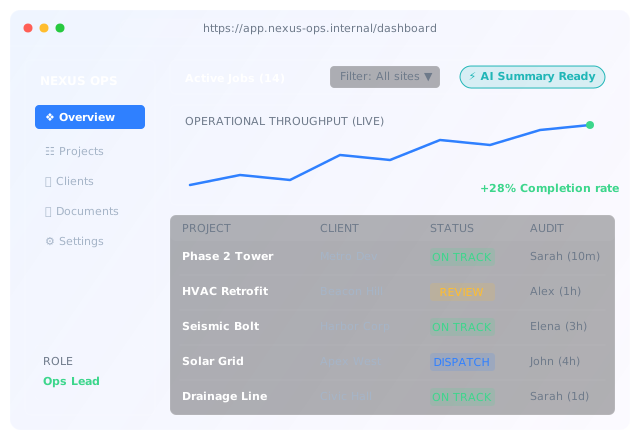
Built for operations needing custom tools and workflows.
Businesses outgrowing a critical spreadsheet
It's load-bearing, it's fragile, and only one person can safely edit it.
Service companies whose clients keep asking for status
Every update request is a phone call. A portal answers it once.
Operations with a workflow no off-the-shelf tool fits
You've trialled four products and configured around all of them.
FULL-STACK APPLICATION ARCHITECTURE
What we build.
Internal applications, client-facing portals, and operations dashboards built for concurrent scale.
Client portals
Customers see their own projects, documents, invoices, and status, with permissions that hold. Fewer status calls, better perceived service.
- Own projects, documents, invoices
- Permissions that hold
- Self-serve status
Internal operational tools
The tools that replace the master spreadsheet: data entry with validation, status transitions with audit logs, and reports that run on real data.
- Replaces the master spreadsheet
- Validated data entry & audit logs
- Live operational reporting
Operations dashboards
Aggregated operational metrics, pipeline status, and SLA monitoring pulled from your disparate data sources into a single pane of glass.
- Cross-system data aggregation
- Live KPI and SLA tracking
- Automated alerting thresholds
Role-based access & auth
Granular permission models, enterprise SSO integration, and session management designed for multi-tier organisational security.
- Granular permission scoping
- SSO & OAuth provider wiring
- Secure session handling
Embedded AI workflows
In-app natural language queries against your database, automated document extraction, and intelligent assistant sidebars.
- Text-to-SQL & reporting query AI
- Automated document ingestion
- Copilot-style assistant sidebars
Spreadsheet sprawl vs. purpose-built app.
A representative operational upgrade.
| Dimension | Before (Spreadsheets + Ad-hoc) | After (Custom Web App) |
|---|---|---|
| Access control | All or nothing (shared file link) | Role-based (client, staff, manager, admin) |
| Concurrent edits | Locking conflicts, overwritten work | Database transactions, real-time sync |
| Audit trail | "Someone changed cell F14" | Timestamped history for every field change |
| Client view | Manual export, emailed PDF | Live self-serve portal with their data only |
| Key-person risk | One person understands it | Documented and shared |
How implementation works.
Phased development delivered in reviewable stages with multi-user validation and role testing.
1. Scope
Free session. What the tool must do, who uses it, and whether something existing already does it.
2. Spec
Fixed price, data model, permissions, and screen inventory agreed in writing.
3. Build
6 to 12 weeks depending on scope, in reviewable stages rather than one reveal.
4. Pilot
Real users on real data, alongside the existing process.
Reference build. A standard implementation pattern for this problem, not a client project. It describes how CloudArk builds this kind of site and what delivery involves.
Spreadsheet Rebuild to Multi-User Operational Portal
Project tracking lived in a shared spreadsheet with twelve tabs. Only the operations manager could safely edit it, and clients phoned for status updates daily.
A web application with role-based access, validated data entry, a full audit trail, a client-facing portal showing live project status, and an assistant summarising project history on request.
Figures are modelled to illustrate the shape of the change, not measured client results.
Two ways AI augments internal applications.
In-app assistant
Summarises records, drafts responses, and answers questions about the data in front of the user.
Exception surfacing
Flags the records that need attention rather than leaving someone to scan the whole table.
Frequently asked questions.
Turn fragile spreadsheets into robust applications.
Book a 30-minute scoping session to map data schemas, multi-user roles, and build specifications.
- Practical business conversation with an engineer, not a sales deck.
- Straight assessment on build versus buy for your use case.
- You keep the scoping findings whether we work together or not.
Thanks for reaching out.
A CloudArk solutions engineer will review your inquiry and email you within one business day with scheduling availability.